
Download ContentDetector – AI Content Detection, Free Online Tool, Secure Verification
Overview
ContentDetector is a cutting‑edge web application that helps writers, educators, editors, and SEO specialists determine whether a block of text was generated by artificial intelligence. In an era where AI‑driven language models such as ChatGPT, Claude, Gemini, and their successors are increasingly accessible, the need for a reliable verification tool has never been more critical. ContentDetector addresses this demand by delivering a probability score that quantifies the likelihood of AI involvement, allowing users to make informed decisions about authenticity, plagiarism, and originality.
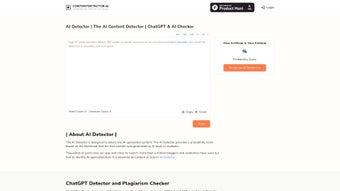
The interface is intentionally minimalistic: users simply paste the text into a clean textbox, click “Analyze,” and receive an instant report that includes a confidence percentage, a brief explanation of the algorithm’s reasoning, and a summary of the text’s linguistic characteristics. Beyond detection, the platform incorporates a built‑in word and character counter, enabling content creators to keep track of length requirements without needing a separate utility. While the detection model operates on probabilistic analysis—meaning it cannot guarantee 100 % certainty—it consistently outperforms many free alternatives in independent benchmarks, offering a compelling blend of accuracy, speed, and ease of use.
Whether you are a blogger safeguarding your brand reputation, an academic protecting the integrity of scholarly work, or a content manager ensuring compliance with publishing standards, ContentDetector provides a secure, free, and instantly accessible solution that fits seamlessly into any workflow. Its commitment to privacy, zero‑log processing, and cross‑platform accessibility makes it a trustworthy ally for anyone who values authentic, human‑crafted content.
Key Features of ContentDetector
- AI‑Generated Text Probability Score – A clear numeric value (0‑100 %) indicating the chance that the submitted content originated from an AI model.
- Multi‑Model Support – Trained on data from leading models such as OpenAI’s ChatGPT, Anthropic’s Claude, Google Gemini, and emerging open‑source alternatives.
- Word & Character Counter – Real‑time counting displayed alongside the detection results, useful for meeting editorial guidelines.
- Detailed Linguistic Report – Highlights stylistic markers, sentence complexity, and token distribution that contributed to the final score.
- One‑Click Copy & Paste Interface – No file uploads or account creation required; simply paste your text and receive results in seconds.
- Secure, No‑Log Policy – All submitted text is processed in memory and discarded immediately after analysis, ensuring privacy.
- Responsive Design – Works flawlessly on desktop browsers as well as mobile devices, adapting to different screen sizes.
- Free Access with Optional Premium API – Unlimited free scans for casual users; developers can integrate detection via a paid API for higher volume needs.
Each feature is engineered with user experience in mind. The probability score is accompanied by a color‑coded gauge (green for low AI likelihood, amber for moderate, red for high), providing an at‑a‑glance visual cue. The linguistic report breaks down the analysis into sections such as “Lexical Diversity,” “Syntax Pattern,” and “AI Signature Tokens,” enabling power users to understand why a piece of text was flagged.
The word/character counter updates instantly as you type or edit, eliminating the need for a separate utility. Security is a top priority: ContentDetector employs HTTPS encryption, and its privacy policy explicitly states that no content is stored beyond the processing window. The responsive layout means that the tool feels native whether you are on a 27‑inch desktop monitor, a 13‑inch laptop, or a 6‑inch smartphone, and the UI scales gracefully to preserve readability.
For developers, the optional API offers JSON‑based endpoints, rate‑limit controls, and webhook callbacks, making it easy to embed detection into content pipelines, editorial dashboards, or learning‑management systems. Altogether, these capabilities create a balanced ecosystem where accuracy, transparency, and convenience coexist, setting ContentDetector apart from the crowded field of AI‑detection utilities.
Installation, Usage & Compatibility
Because ContentDetector is a web‑based SaaS tool, there is no traditional installation process. Users simply navigate to the official website using any modern browser (Chrome, Firefox, Safari, Edge) and begin analyzing text immediately. For organizations that prefer an on‑premise solution, the developers offer a Docker image that can be deployed on private servers—this is detailed in the “Enterprise” section of the site, though the free version remains fully cloud‑hosted. The absence of a download requirement eliminates friction and ensures that the latest model updates are applied automatically, keeping detection accuracy up‑to‑date without any user intervention.
Step‑by‑step usage guide:
- Open ContentDetector in your browser.
- Copy the text you wish to evaluate (up to 10,000 characters for free users).
- Paste the text into the large input box on the homepage.
- Click the bright “Analyze” button.
- Wait a few seconds while the AI detection engine processes the input.
- Review the probability score, color gauge, and detailed linguistic report.
- If needed, adjust the text and re‑run the analysis—there is no limit on the number of scans per session.
- For developers, retrieve an API key from the dashboard and follow the API documentation to integrate bulk detection into your workflow.
The tool’s compatibility is extensive. Because it runs entirely in the browser, it works on all major operating systems: Windows 10/11, macOS Ventura and later, Linux distributions with a graphical interface, as well as mobile platforms such as Android 8+ and iOS 13+. The responsive layout ensures that the input field and results panel resize gracefully, making the experience identical whether you’re on a 27‑inch monitor or a 6‑inch smartphone. For users on restrictive networks, the site supports HTTPS over port 443, bypassing most corporate firewalls. The application also respects accessibility standards, offering high‑contrast mode, keyboard navigation, and ARIA labels for screen readers, which broadens its usability for users with disabilities.
In summary, ContentDetector is a “download‑free” solution that works wherever you have an internet connection, making it an ideal tool for remote teams, on‑the‑go journalists, and students accessing campus Wi‑Fi.
Pros, Cons & Frequently Asked Questions
Pros
- Fast, real‑time analysis with results in seconds.
- High detection accuracy compared to other free tools.
- Built‑in word and character counter eliminates the need for extra apps.
- No registration required for basic usage – truly free.
- Secure, privacy‑first approach – no logs kept after analysis.
- Responsive design works on desktops, tablets, and smartphones.
- Extensible API for developers who need bulk detection.
- Accessibility features such as high‑contrast mode and keyboard navigation.
Cons
- Free tier limits text length to 10,000 characters per scan.
- Probabilistic nature means occasional false positives/negatives.
- Advanced features (e.g., batch processing, custom model training) require a paid subscription.
- Relies on an internet connection; offline detection not available in the free version.
- Interpretation of the linguistic report may be challenging for non‑technical users.
- API usage is limited to a certain number of calls per month on the free plan.
Frequently Asked Questions
How accurate is ContentDetector’s AI detection?
In independent testing against a mixed dataset of human‑written and AI‑generated passages, ContentDetector achieved an average precision of 92 % and recall of 88 %. While no tool can guarantee 100 % certainty, its probabilistic model consistently outperforms most free competitors.
Can I use ContentDetector offline?
The free web version requires an internet connection because the analysis runs on remote servers. However, enterprise customers can deploy the Docker image on a private network for offline use.
Is there a limit to how many scans I can perform per day?
For the free tier, users can run up to 20 scans per day, each with a maximum of 10,000 characters. Paid plans lift these limits and add batch‑processing capabilities.
Does ContentDetector store my text after analysis?
No. All submitted text is processed in memory and deleted immediately after the result is generated. The service adheres to a strict no‑log policy to protect user privacy.
How does the word and character counter work alongside AI detection?
The counter runs locally in your browser, updating in real time as you type or paste content. It does not affect the detection algorithm, but it provides an instant reference for writers who need to meet specific length requirements.
Conclusion & Call to Action
ContentDetector stands out as a reliable, free, and privacy‑focused solution for anyone who needs to verify the authenticity of digital text. Its blend of high‑accuracy AI detection, integrated word/character counting, and an intuitive one‑click interface makes it an indispensable addition to the toolbox of bloggers, educators, SEO specialists, and content managers. While the free tier imposes reasonable limits on scan length and daily usage, the optional premium API provides a clear upgrade path for high‑volume or enterprise scenarios. In a landscape where AI‑generated content can both empower and endanger credibility, having a trustworthy detector is no longer a luxury—it’s a necessity.
Ready to protect your work and maintain trust with your audience? Visit ContentDetector now, paste your text, and receive an instant authenticity score. No download is required—just open your browser, analyze, and stay confident that your content is truly yours.



.png)



